
Beginner Garden
An easy-to-grow garden consisting of four raised beds with a selection of reliable crops.

Overview

Create Your Plan
Personalized Planting Calendar
Maximize Your Harvest

Hear directly from customers using the Garden Planner every day to plan their most productive garden ever.

This planner is the best there is.
Ron in Puget Sound

This planner is the best there is.
Everything you need to know is at your fingertips.
Plant info, garden layout, size, ease to make a plan, and it is easy to use.
I love it and have been using it for years.
Best gardening design and information app online!
Trusted Customer
This is the best garden planner and gardening information site online!!!
I have used it for years, given it as gifts, ane love it.
It is so easy to use, has an amazing wealth of guides and informational videos, and the customer service response is very quick and very thorough and helpful.
I highly recommend this app to anyone who loves to garden.
Outstanding product!
Dee k. in Gainesville, Tax
Outstanding product.
Make gardening so much simpler!
I love it so much l gifted a year subscription to my sister.
She loves it too!
Simply the best!
Trusted Customer
Love this! Super easy to use.
Regular updates.
Helps keep track of what went where so you can properly rotate.
As well as a ton of other features.
I can't recommend it more.
Great easy product from Novice to experienced gardener.
Claire-Louise
The product was very easy to start and within 20minutes I had a plan for my veg patch.
It also tells me how many plants i'll need, when to sow and pot on, plant & harvest
With the notification's on what to do - it should keep me on track!

1,034,104 garden plans
created by 869,812 gardeners
The Garden Planner is versatile for any garden shape or size, supporting various methods like rows, containers, and square foot gardening.
Start from scratch or choose from one of our beginner-friendly templates
Or take a look at some of the impressive gardens created and shared by our users...

Tailored to your local climate
using data from 5,000 weather stations
Get tailored sowing, planting, and harvesting plans with email alerts based on live climate data from 5,000+ weather stations.
The Garden Planner covers all major regions globally, and for other areas, simply input your local frost dates for accurate planting schedules.

Personalized how-to videos and articles,
based on what you’re growing

Every plant you’ll ever need
for a thriving garden
Choose from over 21,657 varieties of veggies, herbs, fruits and flowers, in one easy-to-use tool.
You can also add ornamental plants, trees & shrubs, and many tropical plants, ensuring your garden will be as unique as you are!
And if we don’t yet have a plant you need, you can easily add your own custom varieties.

Your gardening questions answered in minutes
by our expert gardeners, 7 days a week

Whether you need help with the Garden Planner or want to ask about companion plants, avoiding pests, or keeping your plants happy, our friendly, experienced customer support team are all expert gardeners and are on standby just waiting to hear from you.
You can contact us via live chat or email, and we'll get back to you as quickly as possible—usually in less than a minute during working hours.
The Garden Planner is versatile for any garden shape or size, supporting various methods like rows, containers, and square foot gardening.
Start from scratch or choose from one of our beginner-friendly templates
Or take a look at some of the impressive gardens created and shared by our users...
Get tailored sowing, planting, and harvesting plans with email alerts based on live climate data from 5,000+ weather stations.
The Garden Planner covers all major regions globally, and for other areas, simply input your local frost dates for accurate planting schedules.
Whether you need help with the Garden Planner or want to ask about companion plants, avoiding pests, or keeping your plants happy, our friendly, experienced customer support team are all expert gardeners and are on standby just waiting to hear from you.
You can contact us via live chat or email, and we'll get back to you as quickly as possible—usually in less than a minute during working hours.
Choose from over 21,657 varieties of veggies, herbs, fruits and flowers, in one easy-to-use tool.
You can also add ornamental plants, trees & shrubs, and many tropical plants, ensuring your garden will be as unique as you are!
And if we don’t yet have a plant you need, you can easily add your own custom varieties.
Hear directly from customers using the Garden Planner every day to plan their most productive garden ever.
This planner is the best there is.
Ron in Puget Sound
This planner is the best there is.
Everything you need to know is at your fingertips.
Plant info, garden layout, size, ease to make a plan, and it is easy to use.
I love it and have been using it for years.
Best gardening design and information app online!
Trusted Customer
This is the best garden planner and gardening information site online!!!
I have used it for years, given it as gifts, ane love it.
It is so easy to use, has an amazing wealth of guides and informational videos, and the customer service response is very quick and very thorough and helpful.
I highly recommend this app to anyone who loves to garden.
Outstanding product!
Dee k. in Gainesville, Tax
Outstanding product.
Make gardening so much simpler!
I love it so much l gifted a year subscription to my sister.
She loves it too!
Simply the best!
Trusted Customer
Love this! Super easy to use.
Regular updates.
Helps keep track of what went where so you can properly rotate.
As well as a ton of other features.
I can't recommend it more.
Great easy product from Novice to experienced gardener.
Claire-Louise
The product was very easy to start and within 20minutes I had a plan for my veg patch.
It also tells me how many plants i'll need, when to sow and pot on, plant & harvest
With the notification's on what to do - it should keep me on track!
1,034,104 garden plans
created by 869,812 gardeners
Tailored to your local climate
using data from 5,000 weather stations
Instant Live Support
from our expert gardeners, 7 days a week
1527 Grow Guides & Counting!
Including videos & pest, disease & insect guides
Every plant you’ll ever need
for a thriving garden
Add plants to your plan and easily drag them around to get your perfect layout
See which plants grow well together at the click of a button with the world's only Evidence-Based Companion Planting system
Be shown where to avoid placing plants based on previous years plans — makes crop rotation simple
Generate a personalized calendar tailored to your local climate - see exactly when to sow, plant, and harvest each crop
Receive planting reminders by email of when to sow and plant what's on your plan based on your local climate


Works on ANY device - no download required

Your free 7 day trial includes:
Full access to the Garden Planner and Garden Journal
Access to all expert Grow Guides, videos and articles at your fingertips
Priority support from our expert gardeners

An easy-to-grow garden consisting of four raised beds with a selection of reliable crops.

A highly productive garden of eight raised beds growing a range of vegetables that the whole family will enjoy.

Two small raised beds with simple-to-grow salads, along with edible flowers that will attract beneficial insects.

A beautiful garden full of flowers that will attract pollinating insects throughout the year.

A beautiful circular herb garden supplemented by herbs that are best grown in containers.
Feed Your Family
Salad Garden
Pollinator Paradise
Herb Garden
More...
An easy-to-grow garden consisting of four raised beds with a selection of reliable crops.
A highly productive garden of eight raised beds growing a range of vegetables that the whole family will enjoy.
Two small raised beds with simple-to-grow salads, along with edible flowers that will attract beneficial insects.
A beautiful garden full of flowers that will attract pollinating insects throughout the year.
A beautiful circular herb garden supplemented by herbs that are best grown in containers.


Easily design your garden space and start adding plants — getting started for beginners has never been this simple.


Automatically space plants to prevent overcrowding, ensuring optimal sunlight, nutrients, and moisture.
Include structures like raised beds and greenhouses.
The Planner auto-adjusts planting and harvesting dates to reflect the protection they provide.


Whether you prefer traditional rows, containers, raised beds, or square-foot gardening, the Garden Planner has you covered.

This garden planner is amazing. It has everything you could possibly need for planning your garden. You can put in raised beds, grow bags, hanging baskets, arbores, trellises, pathways, they have everything you can imagine. They have pretty much every vegetable, plant and tree you can think of. They have greenhouses, beehives. chicken coops. They have everything. This is awesome. You put the plants where you want them, then go to plant list and it tells you when to start them indoors. direct sow, when to harvest. its so simple.
As you create your garden layout, the Garden Planner automatically builds your personalized calendar which adjusts any time you change your plan.
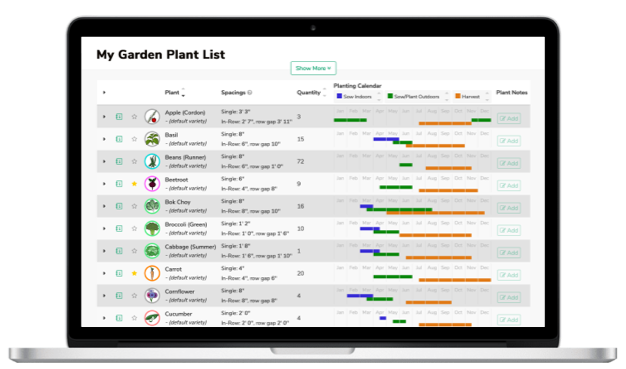

Your calendar and planting recommendations are based on your own plan and local climate data from your nearest weather station.
Stay on track with email reminders when it’s time to plant, sow, and harvest each crop.

I was trying to run a schedule on spreadsheets and notepads but gave up on it once I tried this app. Absolutely BRILLIANT with everything in the one spot and takes into account conditions for any location. Highly recommended
Companion planting
The world's most advanced Evidence-Based Companion Planting system — suggests plants that grow best together at the click of a button
Crop rotation
Helps you avoid a build-up of soil-borne pests and diseases from year to year
Succession Planting
Make the most of your space, and see when and where you have space to grow more
Follow-on Plans
Create next year's plan from the previous year's plan with the click of a button


Companion planting recommendations show you exactly which plants to grow, encouraging beneficial bugs into your garden to take care of pests naturally.
And sometimes pests and diseases can still rear their ugly heads. Get straight to the root cause with clear advice on minimizing the damage without pesticides.


Track your progress in our Garden Journal — add notes and photos from your phone
Timely, personalized videos based on what's in your plan and what's seasonally relevant for your area.
Watch as our experts guide you through the steps to gardening success.

As well as smart features to help you plan your garden, the Garden Planner is packed with all the gardening information you’ll ever need, at your fingertips:
Specific growing advice on 21,400 varieties of 408 vegetables, herbs, fruit and flowers (and counting!)—written by experts in the USA
Weekly seasonal tips, videos and articles written by our team of acclaimed gardening experts
441 high quality How-To videos demonstrating all the gardening techniques you’ll ever need—and more!
Detailed advice on how to avoid pests eating your precious crops
The Garden Journal, which makes it simple to add notes, photos and harvests to track what works best in your garden


Whether you’re an experienced gardener or a total beginner, the Garden Planner is the ideal way to plan your perfect garden.
Beginners can get started in just a few clicks with our ready made templates that are perfect if you are new to gardening, while experienced gardeners love how the Garden Planner helps bring their grandest visions to life.
The Garden Planner’s smart plant filters help you choose only crops that will thrive in your garden’s conditions—so you won’t waste money on crops that aren’t perfectly suited. Simply select what you want to grow, and drop it into your plan.
The Garden Planner automatically ensures the correct spacing between plants to avoid overcrowding, ensuring they receive enough sunlight, and making most of available nutrients and moisture.
Move plants and other objects around easily, at any time until you create the perfect layout for your garden—no more erasing and redrawing whenever you change your mind.
Add structures and objects like raised beds, sheds, greenhouses, cold frames—and much more. The Garden Planner even adjusts planting and harvesting dates automatically to reflect the protection they provide.
And everyone can take inspiration from garden plans shared by people in your local area.

As you create your perfect garden layout, the Garden Planner automatically builds your personalized calendar, which adjusts any time you make changes to your plan.
You’ll receive personalized email reminders letting you know what to plant in the next 2 weeks, based on your own plan and local climate data from your nearest weather station.
You’ll also get a shopping list showing exactly which plants to buy and how many you need.
The handy companion planting tool suggests which plants grow best together, based on the latest research (unlike most companion planting advice online!).
You’ll also get crop rotation notifications to help maximize your garden’s health and productivity by avoiding a build-up of soil-borne pests and diseases.
There’s no need to keep track of all the different plant families or what grew where in previous years —the Garden Planner does this for you automatically!
Make the most productive use of your space throughout the year using the Succession Planting tool which enables you to see when plants will be growing, and when and where you have space to grow more.
And at the end of the year, create next year's Follow-on Plans from the previous year's plan with the click of a button—no need to start again from scratch each year.


And sometimes—despite our best efforts—pests and diseases can still rear their ugly heads.
Would you know what to do if your tomatoes have holes in them or your garlic developed a downy mildew on the leaves? What if your bean leaves have brown spots on them or you discover an outbreak of aphids on your cabbages?
In some cases there could be literally a dozen causes.
The Garden Planner helps you get straight to the root cause with detailed articles and videos on every relevant pest and disease, and how to minimize the damage to your precious crops without pesticides or other chemicals.

Record when you planted or last watered, diagnose problems and track how much you've harvested—The Garden Journal automatically creates reports on your progress, as well as reminders of jobs that need to be done in the next two weeks.
When you come to plan next year’s garden, information about what worked best and how much you harvested of each variety is neatly summarized right within the Garden Planner.
You can contact us via live chat or email, and we’ll get back to you as quickly as possible—usually in less than a minute during working hours.

Ben is our YouTube star, published author and passionate gardener with a degree in horticulture and experience growing in the UK and US.

Barbara is one of the foremost experts on gardening across the US, having written more than 20 books and won multiple awards from the Garden Writers Association.

Ann Marie has a wealth of gardening experience in Scotland. She writes articles, edits our website and provides customer support.

A keen allotmenteer and chicken rescuer, Janine is a member of our dedicated customer support team. Her chickens occasionally join our video calls if it's cold outside!

When she’s not helping our customers get the most from the Garden Planner, Elaine is happiest in the garden with a steaming mug of tea, listening to the birds, watching her veggies grow and roses bloom.

Teri is a member of our customer support team. She loves to grow organic fruit and vegetables, especially using permaculture techniques and perennial plants.

Roisin is part of our customer support team and enjoys exploring the Peak District with her dog.

Susie is an avid gardener. She manages our customer research and social media communities on Facebook, Pinterest etc.

Heidi is a Canadian transplant living the UK. She develops our internal tools and coordinates between development and customer support.

Jeremy, the original creator of the Garden Planner, is an avid computer programmer and keen organic gardener.
When she’s not helping our customers get the most from the Garden Planner, Elaine is happiest in the garden with a steaming mug of tea, listening to the birds, watching her veggies grow and roses bloom.
Teri is a member of our customer support team. She loves to grow organic fruit and vegetables, especially using permaculture techniques and perennial plants.
Roisin is part of our customer support team and enjoys exploring the Peak District with her dog.
Susie is an avid gardener. She manages our customer research and social media communities on Facebook, Pinterest etc.
Heidi is a Canadian transplant living the UK. She develops our internal tools and coordinates between development and customer support.
Jeremy, the original creator of the Garden Planner, is an avid computer programmer and keen organic gardener.
Ann Marie has a wealth of gardening experience in Scotland. She writes articles, edits our website and provides customer support.
A keen allotmenteer and chicken rescuer, Janine is a member of our dedicated customer support team. Her chickens occasionally join our video calls if it's cold outside!
When she’s not helping our customers get the most from the Garden Planner, Elaine is happiest in the garden with a steaming mug of tea, listening to the birds, watching her veggies grow and roses bloom.
Teri is a member of our customer support team. She loves to grow organic fruit and vegetables, especially using permaculture techniques and perennial plants.
Roisin is part of our customer support team and enjoys exploring the Peak District with her dog.
Susie is an avid gardener. She manages our customer research and social media communities on Facebook, Pinterest etc.
Heidi is a Canadian transplant living the UK. She develops our internal tools and coordinates between development and customer support.
Jeremy, the original creator of the Garden Planner, is an avid computer programmer and keen organic gardener.
The product is easy to use but the service from your super knowledgeable team is SPECTACULAR!
Finally found a garden planner that works for me!
Sandy B. in Michigan Upper Peninsula
I would (and have) highly recommend the Garden Planner for anyone that enjoys gardening.
I particularly like the feature of being able to show succession plantings. And I also love Ben's videos, of course!
I've tried several other planners over the years, and have also used graph paper and colored pencils to diagram my garden, this planner is light years ahead of any other method I've used
So easy to use
Cheri in Lake city, FL
It is easy to use in designing the garden areas. Each plant's information and planting chart makes that so easy.
The journal makes it easy to keep track of seeding, transplanting, and harvesting information to use for next season.
Great, easy product from novice to experienced gardener
Claire-Louise
The product was very easy to start and within 20 minutes I had a plan for my veg patch.
It also tells me how many plants I'll need, when to sow and pot on, plant & harvest.
With the notifications on what to do - it should keep me on track!
We love to hear your ideas and—in fact—many of the updates we’ve made over the years have been directly suggested by our users. And we’ll even email you back to let you know when we’ve added your suggestions.
See exactly how to get the most from your garden space with videos selected to match what you’re growing in your garden.
Watch as our experts guide you through the steps to gardening success.
Get super quick answers on everything from help with using the Garden Planner through to questions about how to grow particular plants or deal with pests.
130+ new plants, including flowers, shrubs and fruit, extending the range of plants to include most of the common ornamental plants that gardeners grow. The Garden Planner now has comprehensive planting and growing information for 408 plants (and counting)!
Search across all your notes in the Garden Journal to find just the information you’re looking for.
Use the full Garden Planner features on your phone, either to create plans or to update them while you’re in your garden.
It's now much easier to achieve the perfect layout of your plan. Send items to the back or front of their layer. Or, lock them to avoid accidentally moving them.
Keep track of your seed packets and ensure you have enough for all of your plans.

Way back in 2006 our founder, Jeremy Dore, was growing organic food with his young children in a small front garden.
Although plenty of books and websites claimed to have all the answers to common gardening questions, he was surprised that none of them gave more than vague advice about planning where and when crops should be planted.
With a background in creating easy-to-use IT systems for education, Jeremy set about creating the perfect tool for gardeners—an online app that really understood how plants grow.
The app takes all the knowledge from the best experts and makes intelligent suggestions in an easy-to-use visual Garden Planner. No more leafing through encyclopedic books or vague articles online and re-drawing plans by hand.
Launching in 2007, the Garden Planner quickly became a world-wide hit and was expanded to cover climates around the world. Since then we’ve grown to a team of 15 experts, and helped over 43 million people—from beginners to experienced gardeners alike—get the most from their gardens


Finally found a garden planner that works for me!
Sandy B. in Michigan Upper Peninsula
I would (and have) highly recommend the Garden Planner for anyone that enjoys gardening.
I particularly like the feature of being able to show succession plantings. And I also love Ben's videos, of course!
I've tried several other planners over the years, and have also used graph paper and colored pencils to diagram my garden, this planner is light years ahead of any other method I've used
So easy to use
Cheri in Lake city, FL
It is easy to use in designing the garden areas. Each plant's information and planting chart makes that so easy.
The journal makes it easy to keep track of seeding, transplanting, and harvesting information to use for next season.
Great, easy product from novice to experienced gardener
Claire-Louise
The product was very easy to start and within 20 minutes I had a plan for my veg patch.
It also tells me how many plants I'll need, when to sow and pot on, plant & harvest.
With the notifications on what to do - it should keep me on track!
Verified independent reviews
with the Garden Planner


Full access to the Garden Planner and Garden Journal
Access to all expert Grow Guides, videos and articles at your fingertips
Priority support from our expert gardeners